
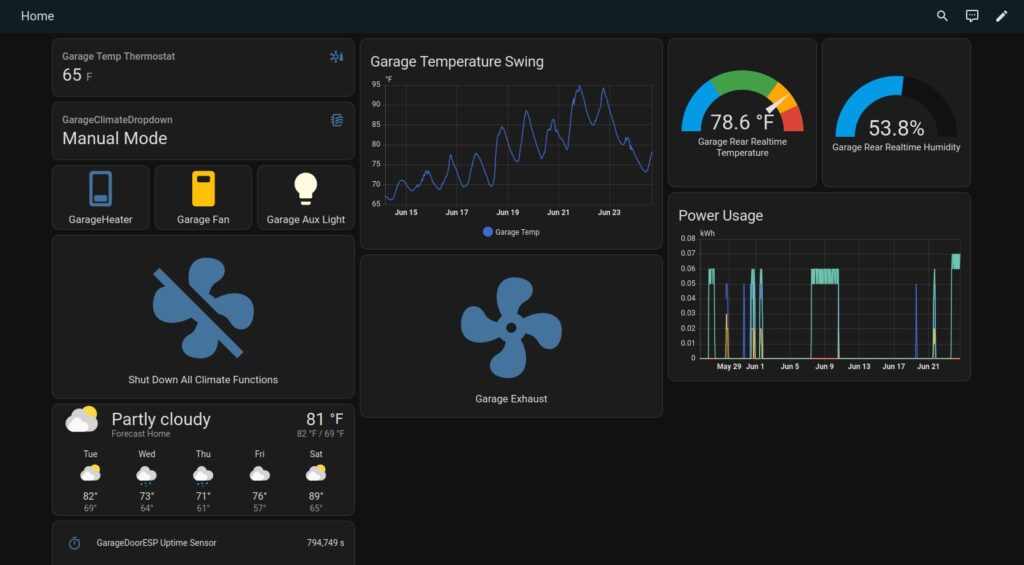
Home assistant is a pretty slick piece of software that can really help simplify some daily problems. It can also give you a little bit more information about something around the house. Here is an example of what I see on my computer, phone or tablet showing a dashboard I use frequently for my garage:
Nice… But what am I looking at?
Alright, you got me. This doesn’t look like a ton of useful information. What’s important to take note of is how I’ve customized the interface to work with the sensors I have. Here is a brief breakdown of a few things here that I considered important when it comes to things out in the garage:
- Top right, there are a couple cards/widgets for a single sensor I purchased that tell me what the real-time temperature is along with matching humidity. That device is the heart of my “pseudo” climate control system.
- Below the above sensors are 3 combined AC power plugs controllable by WiFi that happen to have some energy consumption in them. These I use to give me an idea of what kind of power I’m using between the fans, exhaust system, lights, etc.
- Top center is a graph showing the temperature swing throughout the day. Kind of nice to see what’s going on out there, especially on hot days when I have things to laser engrave and it’s 90+ Fahrenheit.
- Bottom Center is a switch that controls the AC plug for my Laser Exhaust system. This is a manual 1-click to turn on and off. It works incredibly well!
- Top left is some information on my “pseudo” climate control with the temperature and what mode it’s in. I’ll include more on this later as you can do some REALLY cool stuff with another piece of software called NODE-RED that Home Assistant can make use of
- Below the climate controls are 3 switches, one for the garage heater, the garage fans and the auxiliary light. Just below that the large SHUTDOWN button is there to turn everything climate related off and switch it to manual mode.
- Lower weather widget is there to just show some quick weather stats.
- Lastly there is one more card/widget at the bottom left that gives detail data about some door sensors I built myself.
That makes a little more sense…
There is a lot going on in that dashboard and it took some time to put all that together. And honestly, that’s just a single dashboard running for the garage and it’s sensors. Not including the kitchen, living-room, basement or the offices!
So you may be asking yourself, how does this help me?
I asked myself the same question when I started automating things around the house. Mostly it had to do with me constantly forgetting to turn off my outdoor lights on the porch and backyard.
The solution to the problem was buy some Home Assistant compatible smart lights and a switch so that I could program them to turn on at a specific time, then turn off in the evening without me having to think about it!
So to answer the questions of “how does this help?” with another question – What do you want to automate that you don’t want to think about?
Examples! Give me Examples!
- Automated Interior lighting – Allows us to cycle lights on/off throughout the evening giving the appearance that we’re home. This saves some energy when everything gets shut off at bedtime, even if someone forgets!
- Basement air circulation fans – We live in an area that the ground retains a lot of moisture. Sometimes our concrete slab down there absorbs ground water, so we cycle the fans to run and keep things dry.
- Outdoor lighting – As mentioned above, but we’ve got colored bulbs that reflect the holidays that happen throughout the year. Red/Green for Christmas, Red/White/Blue for July 4th and so on.
- Door/Window sensors galore – Entrance doors have them with specific timers set with a notification on my phone to check to make sure everything is locked. Also for entrance doors that should be closed before we turn the AC or the furnace on.
- Over the Stove Light – Turns on in the AM while it’s still dark outside and off for the day. Once it’s evening, it turns back on for supper time and off again right around bed time.
- Water Leak Sensors – Our house is old and some of the plumbing was put together with older “questionable” methods. We had a leak sensor under problematic pipes while we gathered up the cash to have it fixed up proper.
Again, these are just examples. As part of doing this blog, I’m trying to do my best to document what I have in the case that someone else might find useful. I’ll go over how to install Home Assistant and get it configured to work properly with a couple different methods. Once I’ve got those posts done, I’ll update buttons with links here.
In the meantime, you can absolutely check out Home Assistant here: https://www.home-assistant.io/
They have tons of information to get started for jumping right in.
Stay Tuned! – NorthstarGeek